WTF is google’s opal?

Google’s Opal is an innovative tool designed to simplify software creation by using natural language prompts instead of traditional coding. It’s part of a new wave of AI-powered "vibe coding" platforms that enable users, even without programming skills, to build custom workflows and mini applications quickly and efficiently.
What Is Google Opal?
Opal is a zero-code tool developed by Google that lets you create software by simply describing what you want to build by a simple language prompt. Imagine telling it what you need, like "Make an app that schedules meetings," and Opal instantly generates a visual workflow showing how the app works step-by-step. You don’t need to write any code or understand technical details such as programming syntax or frameworks.
It uses multiple Google AI models working together to interpret instructions and link various tasks in the right order to build your app. This visual workflow can be edited and customized by afterward, and once satisfied,publish the app online.
How Does Opal Work?
The process of using Opal involves a straightforward workflow:
-Step 1: Describe Your Idea
Start by typing or speaking your app idea in simple words. For example, "Create a fitness tracker that logs daily workouts" or "Build a to-do list that sends reminders."
-Step 2: AI Builds the Workflow
Opal’s AI models understand your intent and create a visual representation of how the app will function. This includes inputs (what users provide), outputs (what the app delivers), and the logic steps in between.
-Step 3: Edit the Workflow
The visual editor lets you see each step clearly and adjust prompts or add new steps manually if needed. You can inspect how the AI interpreted instructions and refine the app’s behaviour.
-Step 4: Publish and Share
When your app is ready, you can publish it instantly as a mini web app. Sharing is easy-just send a link to anyone with a Google account so they can use or try the app right away.
-This approach dramatically lowers the barrier to creating useful software, letting you focus on your idea rather than technical details.
What Makes Opal Different?
Opal stands out from other no-code platforms in several ways:
-Vibe Coding Approach: Unlike drag-and-drop no-code tools, Opal relies heavily on natural language descriptions paired with AI to chain multiple tasks and processes automatically. This lets users express complex software logic without learning visual components or scripting.
-Visual Workflow Editor: Every part of your app's workflow is laid out visually for easier editing and understanding. You’re not just handed a black box—you see exactly what’s happening and can change it if you want.
-Speed and Flexibility: Because multiple AI processes run in parallel, Opal builds apps quickly, often in less than a minute for simple projects. You can start basic and keep improving the app by tweaking the workflow naturally.
-Integration with Google’s AI Ecosystem: Opal integrates with Google Gemini tools, allowing use of advanced AI features within your app workflows, making your creations more powerful and capable.
-Sharing and Collaboration: You can share your created apps and even remix apps created by others, enabling collaborative creativity without coding.
Who Is Opal For?
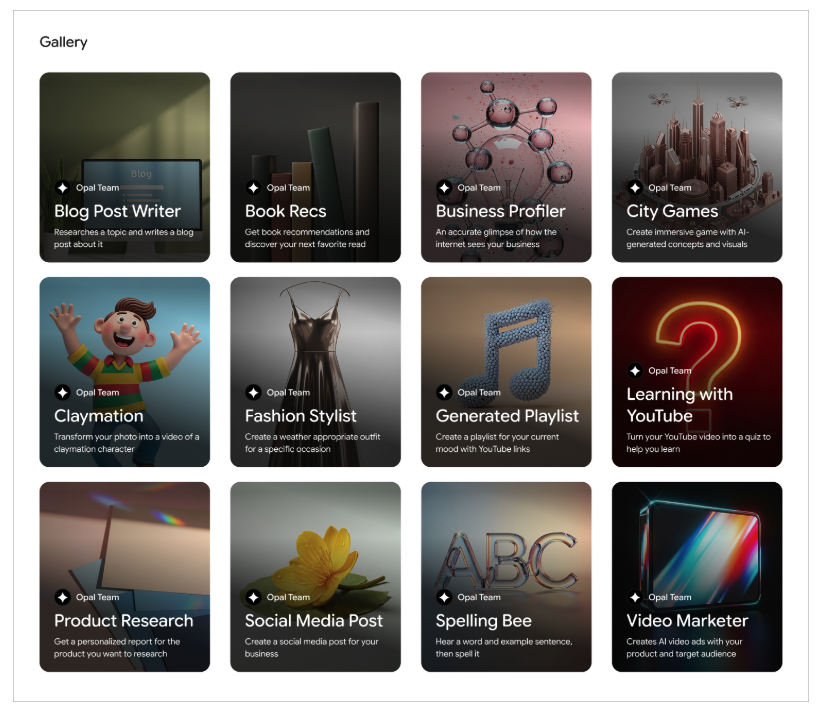
Google designed Opal primarily for people who want to create software but don’t know how to code. This includes knowledge workers, general creators, small business owners, and anyone interested in automating tasks or building mini-apps quickly.
It’s particularly helpful for people wanting to test ideas fast and validate their software concepts with working prototypes, without needing a developer. It is useful for building small-to-medium workflows like task managers, appointment schedulers, customer portals, or internal tools.
Advantages of Using Opal
No Coding Required: Anyone can build apps just by typing what they want.
Saves Time and Money: Faster app creation means less upfront development cost and quicker turnaround.
Easy to Modify: Visual editing of workflows lets you fix or improve apps without redoing everything.
Powered by Google Cloud: Reliability and scalability come from Google’s trusted cloud infrastructure.
Encourages Experimentation: You can test different ideas rapidly, which is great for startups and small businesses.
Limitations to Keep in Mind
While powerful, Opal is best suited for relatively simple or moderately complex apps. Very intricate backend systems or multi-layered logic may be difficult to create solely with vibe coding. Also, while Google ensures robust security, businesses should still implement standard practices like encryption and access controls when deploying apps built with Opal.
Example Use Case
Let's say you want to build an app that helps your team manage projects. You just say, "Create a project tracker with task assignments and deadline reminders." Opal will build the workflow showing how tasks get assigned, reminders sent, and progress monitored. You can then open this workflow, tweak reminders or add a feature like file sharing, and publish the app for your team to use-all without writing a single line of code.
Why Does Opal Matter?
Opal is part of a broader trend to make software development more accessible and less technical. It fits into the future where AI helps bridge the gap between ideas and execution, freeing people from the complex languages and technical hurdles of traditional programming.
Tools like Opal empower a wider range of people to build solutions tailored to their needs. This can lead to more innovation, faster problem-solving, and a more inclusive tech landscape where creativity is the main requirement.
Google Opal is a vibe coding tool that changes the way how apps get built. You simply provide natural language instructions, and Opal AI generates a visual workflow representing your app logic. You can edit this workflow, publish your app online, and share it with others easily. It offers a faster, more intuitive way to create software without coding, making app creation accessible to everyone. This tool brings software ideas to life with minimal effort, helping users focus on their vision rather than technical details.
About the author
- LLMs • AI Agents • RAG • LangChain • LangGraph • Fine-Tuning • Reinforcement Learning • Python • APIs
Comments
Join the discussionNo comments yet. Be the first to comment.